

Requestor1 can log on Business Internet Banking, go to ‘Accounts’ > ‘Business Information Update’ > ‘Submit a request’ to raise a business information update request
Digital
Online Business Information Update
Update your business information online
Our new digital service allows you to update business information like change of directors, authorised signatories, physical signing instructions and beneficiary owners via Business Internet Banking with ease. Your new directors and authorised signatories can submit signatures and existing directors can approve instructions via our mobile app, saving your time and effort to visit a branch or call us.
Watch the video to learn more
Easily update your business information within 4 working days# at the fastest

Step 1

Step 2*
New Directors/Authorised Signatories provide signature specimen through mobile banking

Step 3*
The approver(s) can simply approve the request using HSBC HK Business Express mobile app
* Users can track the steps on Business Internet Banking status tracker, and the non-Business Internet Banking users have to complete identity verification via HSBC HK Business Express mobile app.
# 4 working days count after customers i) complete above step 1 to 3 and instructions successfully submitted to us for processing; ALSO ii) all information provided to us is accurate and complete
Online business information update is available to the below company types and changes:
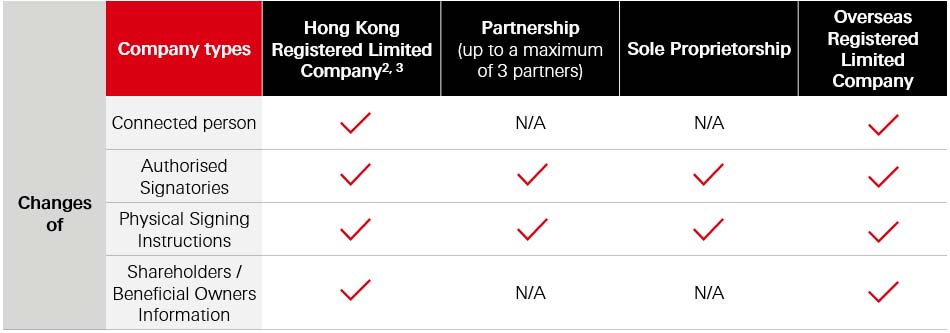
Remarks
- A requestor must be a Business Internet Banking primary user who is an authorised signatory (secondary user cannot access to this function).
- Hong Kong registered limited company includes but does not limit to company incorporated outside Hong Kong and registered in Hong Kong as a foreign company.
- Not applicable to company with (1) corporate director/ authorised signatory and/or (2) Business Internet Banking portfolio linked up with associate companies are excluded.


Need help?
If you have question about our products and services, please click ‘Chat with us’.